


Most of my conversations with Hermes start in Telegram.
I send it a message in the same way I would message a colleague: research this, turn these notes into a product brief, check a website, move a Trello card, create a blog draft, inspect a broken workflow or remind me what we decided last week.
The reply is only the visible part. Behind the chat, Hermes can use the tools and systems I have connected to it. That is what makes it useful to me. It is less like opening a chatbot for an answer and more like having one place from which I can run the rest of my work.
This did not happen in one big setup. I gave it capabilities gradually, usually after noticing that I was repeating the same transfer between tools.
The simple version of the architecture
I do not think about the architecture as a complicated technical diagram. I think about it as five layers.
Telegram is the front door. It is where I can ask for work, approve something, send an image or receive a useful result without sitting at my desk.
Hermes is the coordinator. It works out what the request needs, loads the right instructions and calls the tools that can complete it.
The tools are its hands. They let it browse websites, work with files, run code, use GitHub, update Notion, manage Trello, publish to my CMS and interact with other services.
Memory and my knowledge base give it continuity. Hermes remembers stable preferences and can search previous conversations. My Obsidian brain stores the material I want to compound over time rather than lose in chat history.
The scheduler handles work that should happen without a new message from me. Research radars, content checks, learning digests and monitoring jobs can run at set times, then put the result where it belongs.
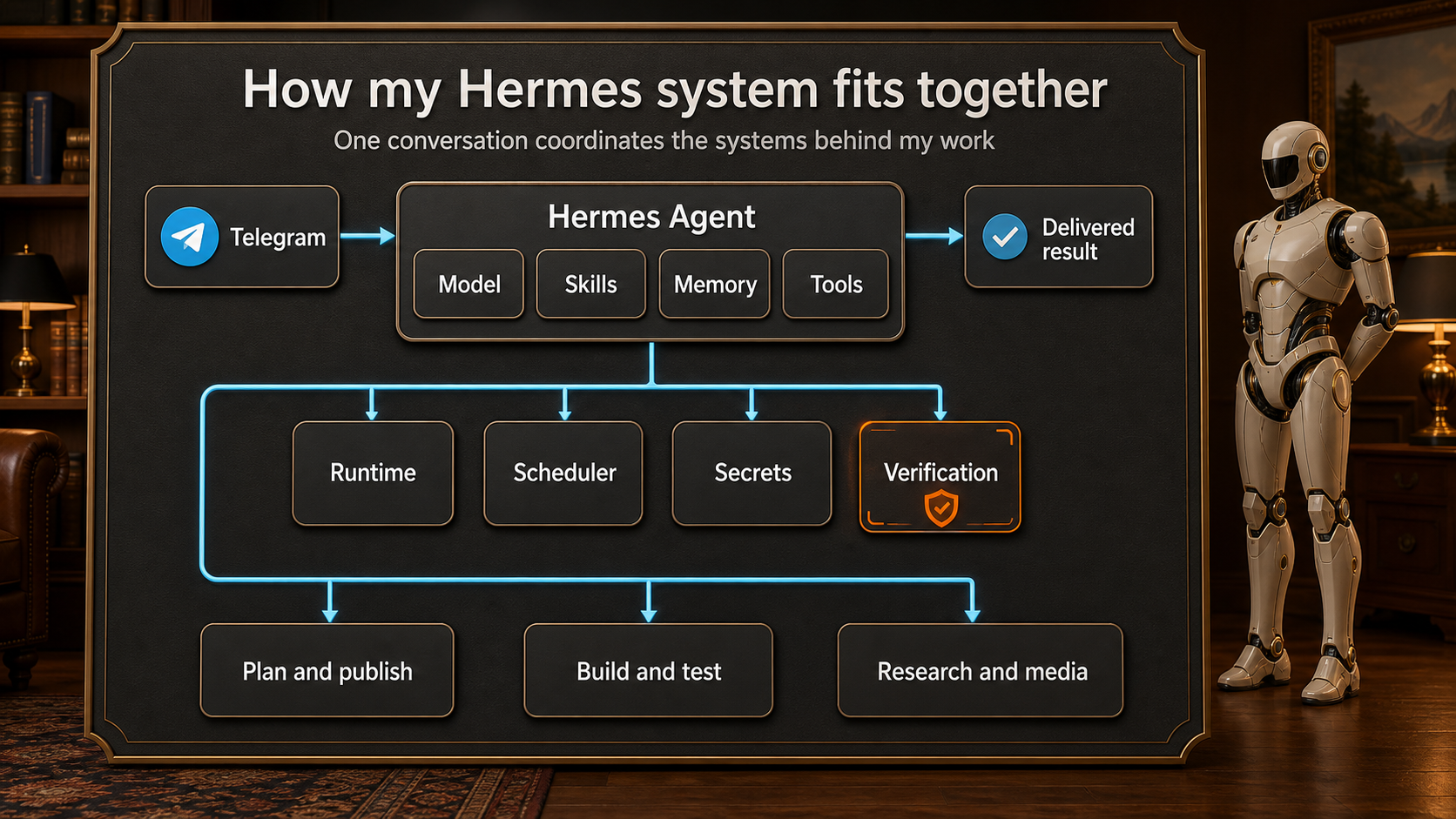
The practical infrastructure: Telegram is the front door, Hermes coordinates the work, and the same context can move into planning, building, publishing, research and media tools. Approval and verification guardrails sit around the whole process.
The important part is that these layers connect. A useful research finding does not have to end as a chat response. Hermes can turn it into a Notion page, add it to the knowledge base, create a Trello task, produce an HTML version or prepare a CMS draft.
The capabilities I have given it
Hermes has access to a wide range of tools, but I do not want it randomly acting across everything. Each connection has a job.
It can research the web and compare sources. It can inspect live websites in a browser rather than assuming a deployment worked because a command succeeded. It can read and edit project files, run tests, work with GitHub and use coding agents for larger builds.
For planning and content, it can create structured pages in Notion, maintain my Obsidian knowledge base and produce visual HTML artifacts that are easier for me to scan. It can generate images, diagrams and video assets when a project needs them.
It can also work with Trello. I use cards as a visible queue for work I want Hermes to pick up. Moving a card into Doing is a simple signal that the idea has become active work. The card description provides the brief, while comments and links can hold the evidence of what was completed.
My CMS is connected too. Hermes can draft a blog post, generate and upload its cover, choose the personal-site destination and verify that the body and image were stored correctly. When I ask it to publish, it can check the live page rather than stopping at "the API returned 200."
There are limits around these capabilities. Secrets stay on the server rather than being pasted into Telegram. Publishing is draft-first unless I explicitly ask for a live post. Paid media generation has approval gates. If a tool fails, I want Hermes to report the blocker rather than invent a successful result.
Those boundaries matter. Giving an agent more tools only helps when it also knows when to stop, verify or ask.
The jobs Hermes runs in the background
Some of the most useful work happens before I send the first message of the day.
Hermes maintains an AI news radar that checks major companies and produces a sourced briefing. A separate radar looks for useful AI tools and possible explainer-video ideas. Another workflow prepares script approval packs so research can move toward production without automatically publishing unfinished content.
It maintains my Obsidian brain and creates a learning digest from new material. It watches for workflow gaps that could become useful Valdris products or articles. It checks Premier League product roles, keeps Mission Control updates ready and runs small watchdogs that stay silent when everything is healthy.
The silence is intentional. I do not want every scheduled job sending me a message each morning. Some jobs update a system quietly. Others notify me only when there is a decision, a failure or a genuinely useful result.
This is where Hermes feels different from a normal assistant. The conversation is not the entire product. It is also running a small set of dependable routines around my work.
How I use it during a normal day
A typical day moves between quick requests and larger pieces of work.
I might start by opening the morning briefing and asking a follow-up question about one story. If the idea is useful, Hermes can expand the research, save the detailed version in Notion and turn the practical angle into a Trello card or blog draft.
Later, I might send a screenshot of a product page and ask why the design feels wrong. Hermes can inspect the image, open the live page, check the browser console and compare the implementation with the brief. If the fix needs code, it can make the change and run the tests. If it needs a visual rethink, it can create a wireframe or a clearer design direction first.
For a new product idea, I use Hermes to keep the chain connected. Research becomes a product brief. The brief becomes a prototype. The prototype is checked in the browser. Decisions and artifacts are stored in the project record instead of remaining scattered across conversations.
I also use it for small operational tasks that would otherwise interrupt the day: finding an old decision, checking whether a scheduled job ran, moving a card, packaging files, validating a public link or turning rough notes into something another person can read.
The value is not that every individual task is impossible without Hermes. Most of them are possible with separate apps. The value is that I do not have to rebuild the context and manually carry the output between those apps every time.
Skills make it work more like my system
Hermes uses skills: reusable instructions for a particular type of work.
A generic agent might know how to write a blog post. My blog skill also knows the fields my CMS needs, that personal posts must target brendantack.com, that the cover must be uploaded and validated, and that a draft should not be described as publicly available.
The same idea applies to research reports, Notion pages, n8n workflows, videos, diagrams and deployment checks. The skill stores the proven workflow so I do not need to repeat the rules in every prompt.
Hermes can update those skills when a real task exposes a missing step. A recent example was image uploading: the endpoint expected raw image bytes rather than a normal form upload. Once that was discovered and verified, the publishing instructions were corrected for the next post.
That compounding behaviour is important to me. The system should become more reliable through use, not force me to rediscover the same problem every month.
Memory is useful when it stays selective
I do not want an agent to remember everything. That would create noise and make old details look more important than they are.
Hermes keeps compact memories about stable preferences, project conventions and the way my systems connect. It can also search previous sessions when I refer to an earlier piece of work. The full knowledge I want to build over time goes into Obsidian, where it can be organised, linked and maintained as a living wiki.
This gives me two forms of continuity. Hermes remembers enough about how I work to avoid starting from zero, while the knowledge base holds the deeper material that should survive beyond one project or conversation.
It still needs judgement
Hermes can run a lot of the process, but I do not want it making every decision.
I still choose which ideas matter, approve scripts, review important claims, decide when something is ready to publish and judge whether a product feels right. Automation removes transfers and repetitive checks. It does not remove responsibility.
I also use different models and agents to review work from different angles. One may inspect the writing, another the code and another the design. Their disagreements help me find the part that needs a closer look.
A useful agent should make judgement easier to apply. It should bring the evidence together, carry out the decided action and show what really happened.
What Hermes runs for me
Hermes now sits between many of the systems I already use: Telegram, Notion, Obsidian, Trello, GitHub, my websites, the CMS, n8n, research sources and media tools.
I did not replace those systems. I added a layer that can move between them with the context intact.
That is the simplest way I can describe how I use Hermes. I can start with a message on my phone, and the result can become researched, structured, built, checked, stored and scheduled without turning the work into a chain of manual handoffs.
The best additions have come from ordinary friction. Whenever I notice myself copying the same information between the same places, I ask whether Hermes should learn that route. Sometimes the answer is no. When the route is repeatable and easy to verify, it usually becomes another useful part of the system.