


Whenever I asked Claude or Codex for a substantial document, I got the same thing back: a Markdown file.
Technically, it was fine. The headings were there. The detail was there. The decisions, caveats and next steps were all somewhere in the document.
But I kept running into the same problem. I am a visual person, and a long .md file is hard for me to scan. Everything starts to look equally important. I have to read line by line to work out what matters, how the pieces connect and where I should focus next.
So I stopped treating Markdown as the finished document.
I now ask Claude and Codex to create a small document system made from three artifacts:
- Notion for the master copy
- Excalidraw for the visual model
- HTML for the reading experience
Markdown still matters. It just has a different job.
Markdown is a good source, not always a good interface
Markdown is excellent for AI-generated work because it is structured, portable and easy to edit. Claude and Codex can produce it reliably. Git can track it. Notion can ingest it. Another model can read it later without fighting a complicated layout.
That makes Markdown a strong source format.
It does not automatically make it the best format for a human trying to understand a 30-page plan on a Tuesday afternoon.
The problem was not the quality of the information. The problem was that I was using the source format as the presentation layer.
Once I separated those two jobs, the workflow became much more useful.
The three artifacts have different jobs
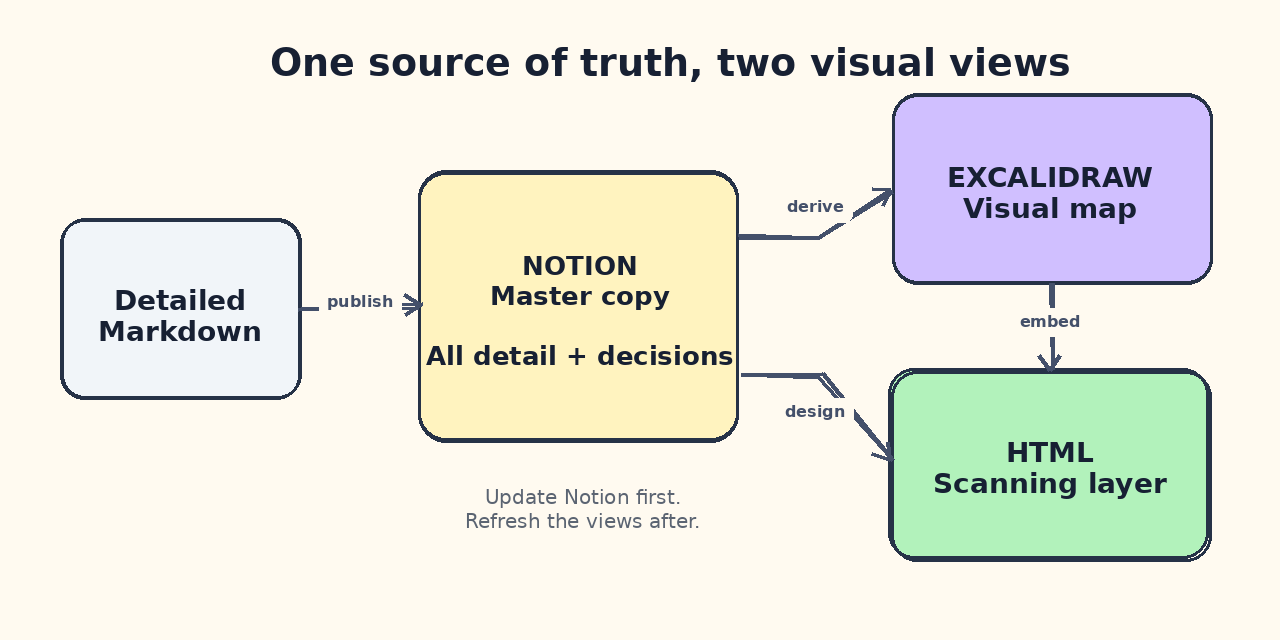
One source of truth, with two visual views built for different ways of thinking.
Notion holds the complete version
The detailed Markdown goes into Notion. This is the master copy.
It contains the full plan, requirements, research, decisions, risks, references and appendices. If I need to confirm exactly what was agreed, Notion is where I look. It is also where I keep the attached HTML file, the Excalidraw source and any supporting assets.
This avoids a common problem with visual documents: they look good, but nobody knows which version is authoritative.
My rule is simple. The Notion page owns the truth. Everything else is a view derived from it.
Excalidraw shows me how the ideas connect
Long documents often hide their own structure.
A process may be spread across five sections. A system may have four components whose relationship is only explained in paragraphs. Dependencies are easy to miss when they are buried in prose.
Excalidraw gives me the map.
I use it for workflows, architecture, decision trees, timelines and phase gates. The hand-drawn style also helps. It feels less like a formal slide deck and more like something I can still question or change.
The diagram does not need every detail from the document. Its job is to show the shape of the idea quickly.
HTML gives me a visual reading layer
HTML is where the information becomes easy to scan.
I can use typography, spacing, colour, cards, timelines, callouts and responsive layouts to make the hierarchy obvious. Important decisions can sit near the top. Risks can have their own visual treatment. A long process can become a horizontal sequence. The Excalidraw diagram can sit inside the page where it adds context.
This is the version I open when I want to understand the document rather than audit every sentence.
It is also easier to share. A browser link is often more inviting than asking someone to download and read a Markdown file.
The workflow I give Claude or Codex
The process now looks like this:
- Create the detailed document in Markdown.
- Place that content in Notion as the canonical version.
- Extract the main system, process or decision model into an Excalidraw diagram.
- Create a self-contained HTML version designed for scanning.
- Embed the rendered diagram in the HTML.
- Put the HTML link and files back at the top of the Notion page.
- Check that the Notion content, HTML and diagram still describe the same thing.
That last step matters. Three artifacts can easily become three slightly different versions of the truth.
I avoid that by treating the HTML and diagram as generated views. If a product decision changes, I update the Notion master first, then refresh the visual artifacts.
A prompt you can reuse
Here is the short version of the instruction I now give Claude or Codex:
Create this as a three-artifact document workflow.

1. Write the complete source document in Markdown.
2. Publish the Markdown into Notion as the master copy.
3. Create an editable Excalidraw diagram for the main workflow,
   architecture or decision model.
4. Create a self-contained responsive HTML version designed for
   visual scanning. Use clear hierarchy, cards, callouts and timelines
   where they improve comprehension.
5. Render and embed the Excalidraw diagram in the HTML.
6. Put the HTML link and all source files at the top of the Notion page.
7. Verify the Notion page, diagram and HTML against the same decisions.

Notion is authoritative. HTML and Excalidraw are derived views.
Do not remove detail from the Notion version just to make the HTML shorter.
The exact tooling depends on what your agent can access. It might use the Notion API, a browser, local scripts or a publishing service. The principle is the useful part: one detailed source, with multiple views built for different ways of thinking.
Why this works better for me
I no longer have to choose between detail and readability.
When I need the full reasoning, I open Notion. When I need to understand the system, I look at the Excalidraw diagram. When I need to scan the document, present it or review it quickly, I open the HTML version.
Each artifact does one job well.
It has also changed the way I ask AI to work. I am no longer asking for "a document" as if a document is one file. I am asking for an information system with a source of truth and a couple of deliberate reading views.
That sounds like a small change. In practice, it is the difference between generating information and being able to use it.
Try it on your next substantial document
The next time Claude or Codex gives you a dense Markdown plan, do not throw away the Markdown. Promote it to the source of truth.
Then ask for the two things the source file is missing: a diagram that shows the structure and an HTML page that makes the important parts easy to see.
For visual thinkers, that extra step can make AI-generated documents feel less like output and more like something you can actually work with.